Family Court Records in Sedgwick County can be accessed through the district clerk’s online portal, where users may perform a family court record search by name, case number, or filing date. The system returns docket entries, court orders, and judgments for divorce, child custody, support, adoption, and protective orders, helping parties verify case status or retrieve certified copies without a courthouse visit.
For those needing a Sedgwick County family court case lookup, the searchable database also lists pending motions, hearing logs, and modified orders. Visitors can request official copies in person or by mail, and the clerk’s office provides fee schedules and identification guidelines to ensure a smooth record request for public family court documents.
How to Search Family Court Records
Family Court Records in Sedgwick County trace the divorce, custody, child support, adoption, parentage, name change, and protective order cases filed in the 18th Judicial District of Kansas. A record search opens the docket sheet for a case, a dated list of filings, hearing appearances, motions, orders, and judgments. You can also explore court calendar through available county records. The search answers three common needs: whether a case exists, where it stands now, and which document answers a particular question. A docket sheet shows what happened in a case, while a certified copy is a separate product that carries the clerk’s confirmation of the record.
Official Search Portal: https://www.dc18.org/records
Steps to Search
- Open the official records page above and choose the court records search link for the district court.
- Enter a case number, a party name, or a filing date range in the search fields.
- Narrow the results by case type or court location when several records share a name.
- Open a matching case and read the docket entries in date order, noting document titles and hearing dates.
- Follow the copy request options on the records page when you need an official or certified copy, and review the fee and identification rules before ordering.
A case number gives the cleanest match, since each filed case keeps one number for its life. Names create more work. A party may appear under a middle initial, a shortened form, or a name used before a marriage, and one person can appear in more than one family case at the same time. If the case number is unknown, a name plus an approximate filing date usually narrows the list to a small number of cases. Check the party names, case type, and filing date together before choosing a result.
Search results show the basic facts of each case, such as the case number, case title, type of proceeding, date filed, and docket status. Opening a result displays the docket sheet, where entries are numbered and dated. Those entries show petitions filed by the parties, motions, orders signed by the judge, hearing appearances, and the closing entries. Online records reflect documents the clerk has filed, and a document handled in the courtroom on the same day as a hearing may appear later.
When a search returns nothing, confirm the spelling of the name and try the case number from an attorney, another agency, or an older notice. If the cause is unknown, the clerk’s office can pull the file and confirm what was filed.
Family Court Case Types, Filings, and Judgments
Sedgwick County family dockets cover several groups of cases, and each type follows its own path from petition to order. The case title and docket entries show which type of matter you have, and that type also tells you which entries answer your question.
Divorce, Custody, Support, and Adoption Filings
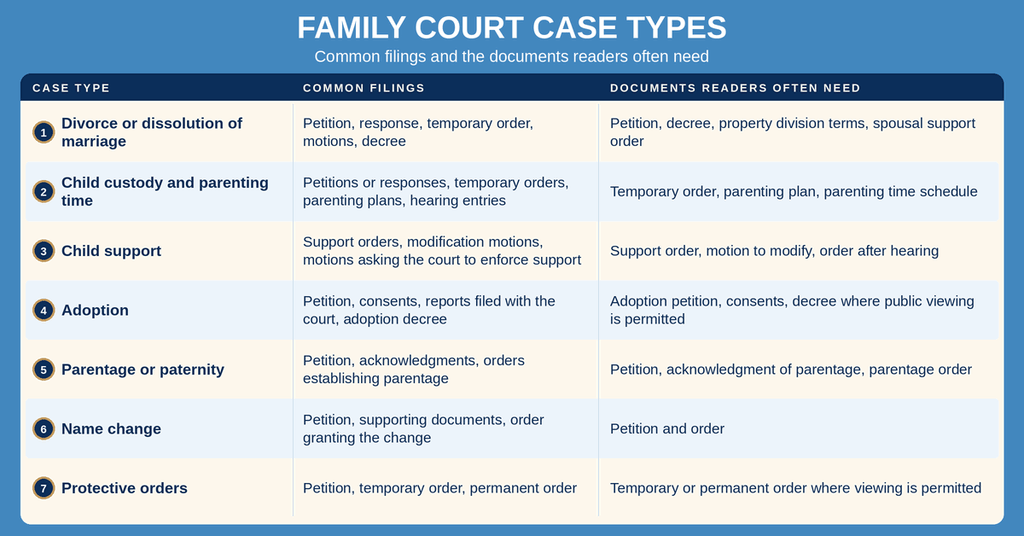
Divorce filings in Kansas begin with a petition for divorce or a petition for dissolution of marriage. The docket then carries responses, temporary orders, financial disclosures when they are filed with the court, parenting plans, and the decree. Property division and spousal support terms appear in the decree or in orders entered during the case. Custody disputes and parenting time are often decided by temporary order first and by a later parenting plan or custody order. Child support appears as orders that set the amount, plus motions asking the court to change or enforce that order.
Adoption files follow a different sequence. A petition for adoption, consents, and reports prepared for the court sit in the file before the court enters an adoption decree. Kansas law limits public inspection of many adoption decrees, so an adoption case may show a caption and docket status without the decree text or images.
One person may have a single case that covers several issues, so a case number can hold divorce, custody, support, and property division documents together. The case number, not the document title, ties those records to the same file.
Paternity, Name Change, and Protective Orders
Parentage cases decide legal parent for a child, and the resulting order can set support and custody terms. A person looking for a paternity acknowledgment or a parentage order should search the family docket for the case holding those filings, since the docket may keep the order beside support and custody motions. A name change case moves from petition to order, and the order records the former name and the new name the court approved.
Protective order cases cover protection from abuse and protection from stalking. Case titles for these matters often use initials rather than full names, so a name search can miss the file and a case number becomes the better search term. Kansas statutes and court orders can close the petition and parts of the file, leaving the docket and the order as the public record. A person named on a protective order may need to ask the clerk about the copy process rather than expecting to download every filing.
Motions, Court Orders, and Hearing Records
Three kinds of entries drive most family case lookups. A motion asks the judge for something, such as a change in support, a new parenting schedule, or action on an earlier order. An order is the judge’s decision on a request, and each order carries a date, so you can tell which ruling controls. A hearing entry shows that the matter came before the court and, in short form, what happened there.
Hearing records also include notices of hearing, appearances, and minute entries from the courtroom. Minute entries give brief summaries, and a full transcript is a separate request with its own form and fee. Docket sheets do not carry the words spoken at a hearing, so a party who needs the exact exchange should order the transcript for the date in question.
What a Docket Sheet Does Not Contain
A docket sheet lists documents by title and date rather than reproducing their full contents in most files. It also does not show documents that are sealed, withdrawn, or filed later in a closed session. If the title on the docket matches the document you need, order that document by its title and filing date.
Case Status, Judgments, and Modified Orders
A docket status shows whether a case remains open or has been closed. An open case may still have a motion pending, a hearing set, or an order waiting to be filed, so the status alone rarely tells the whole story. Read the last entries to see what action came next and what remains.
A judgment ends the case and states the case outcome, and the decree of divorce is the judgment that ends a divorce case. A modified order changes an earlier order, and each modification carries the date of the hearing and the date of the signed order. Individuals can also check traffic ticket case files to verify relevant details. When comparing two documents, match the case number and the order date rather than the file name, since many entries share a short title such as “Order on Motion.”
Public Availability and Official Copies
Public viewing and official copies are two different services in Sedgwick County. The online search shows the docket history that the clerk’s system exposes, and a copy request asks the clerk to produce a document from the file. Some files sit in the clerk’s care in paper or electronic form, and some documents carry restrictions that limit who can receive them.
The District Clerk and the Records It Keeps
The district clerk keeps the case records for the 18th Judicial District, which covers Sedgwick County. The clerk’s office files petitions, orders, and judgments, maintains the docket sheets, and issues certified copies. Other Kansas courts keep their own files, and an appellate case in the Kansas Court of Appeals sits outside the district court docket. The clerk’s records page lists the search outlets, copy request options, and fee schedule that apply to each service.
Restricted Juvenile, Financial, and Sealed Data
Not every document in a family case can be read by the public. Juvenile records in Kansas carry confidentiality limits. Adoption decrees face limits on public inspection. Petitions and supporting filings in protective order cases may be closed by statute, and a judge can seal any document by signed order. Financial records such as tax returns, bank statements, and income verification stay out of public view unless they were filed in the case or produced through the discovery process.
The clerk applies these rules when a member of the public asks for a copy, and the online search may show the case caption and docket entries without the sealed documents. When a needed document does not display, ask the clerk which restriction applies and what the court requires for that type of file.
Ways to Request Copies
Public family court documents in Sedgwick County can be viewed online or requested through the clerk. The records page states which route fits each document and what payment each request needs.
- Read records online: The portal opens docket sheets and, for many files, document images that can be read without visiting the courthouse. The records page identifies which files offer images and which require a copy request.
- Mail a written request: Send the case number, the party name, the document title, the date of the filing, and payment to the clerk’s office. Include a self-addressed stamped envelope if the copies must be returned by mail, following the request instructions on the records page.
- Ask at the Family Court clerk’s counter: Staff can pull the file, prepare ordinary copies, and explain the certification process during the same visit.
- Request transcripts and hearing records: A transcript of a hearing or a certified copy of a specific minute entry follows a separate request path with its own form and fee.
- Check status before ordering: Use the published fee schedule and ask for the current processing time. Copy orders move through a queue, and the clerk can state what to expect for a document type before payment.
Certified Copies, Fees, and Fulfillment
A certified copy carries the clerk’s attestation that the document matches the record on file on the date the clerk certifies it. A plain photocopy shows the same words with no such confirmation, and a party filing it in another court, an agency, or with an employer may be asked for certification. Request certification at the time of the order instead of after the copies arrive.
The fee depends on the document type, the number of pages, and whether certification is added. The clerk publishes the current schedule on the records page, and accepted payment methods can change, so check that page before sending a check or paying online. The clerk can also state the current processing time for a request, and that time shifts with the number of orders in the queue and with the document type. Keep the receipt and the request details so a later question can be matched to the right order.
For an in-person request, bring a government-issued photo ID and the case number. The records page lists identification rules, and requests that involve a minor, a protected person, or a sealed file may call for extra proof or a court order. Anyone collecting copies for another person should ask the clerk what the office requires before the visit.
Record Accuracy and Missing File Resolution
Most search problems trace back to a name that does not match the file, a recent filing that has not posted, or a document closed to public view. Working through those three causes in order settles most questions without a courthouse visit.
Matching Party Names and Case Numbers
Party names are recorded as they appear on the filing, and that may not be the name you expect. Middle initials, nicknames, and former names all create search misses, and a party with multiple cases creates extra results. Search by case number whenever you have it, then read the full party names in the case title. When two results look alike, compare the case type and the filing date to find the right file.
Case numbers never change, so a number taken from an old notice, an attorney, or another agency can pull the exact file after a name search fails. Copy the number exactly as shown on the notice or docket, including its letters and digits, since the portal treats the number as one unit.
Delays for Recently Filed Cases
Documents do not post the moment they are signed. A judge may sign an order after the hearing, the clerk may receive and process it later, and a recent filing can sit outside public view until then. A case opened days earlier may show a petition and nothing after it. When a recent document is missing, check again after a few working days and confirm with the clerk that the document was received and filed.
Files Missing From the Search
- Search by case number instead of a name, which removes spelling and naming problems.
- Try former names, initials, and the middle name used on the filing.
- Check that the case was filed in Sedgwick County, since another Kansas county keeps a separate file.
- Look for the case under the type of filing it holds, such as a parentage order or a modification of a support order.
- Ask the clerk whether the document is sealed, confidential, or held in a juvenile file.
- Ask the clerk to check the file in the office when the online docket shows no matching entry.
- Confirm that a copy request was received, paid, and sent to the correct place, and keep the receipt.
The clerk’s office is the official source for a Sedgwick County family court file. Staff can pull the docket, confirm a filing date, and state whether a document exists inside a restricted file. That answer settles most questions about records that appear missing, delayed, or inaccurate on the portal.
Family Court Records Compared With Other Public Records
Several kinds of records sit close to family court cases, and each one belongs to a different office. Searching the wrong system produces an empty result that can look like a missing file.
Family court records are maintained by the District Court Clerk for the 18th Judicial District in Sedgwick County. They include dockets, petitions, motions, orders, and judgments related to divorce, custody, support, adoption, parentage, name changes, and protective orders. Civil case records cover disputes involving contracts, property, and personal injuries, while criminal case records contain charges, warrants, and sentencing information.
Child support agency records are maintained by the Kansas Department for Children and Families and document administrative actions separate from court files. Birth and death certificates are issued through the Kansas Department of Health and Environment and are distinct from court orders. Contact the relevant office to obtain the appropriate records.
Family court records and divorce records overlap, because a divorce case sits in the family category for that county. A child support payment history belongs to the agency that administers support, and a birth certificate comes from the state office that keeps those certificates. Orders about custody, support, parenting time, property division, and spousal support come from the clerk’s file. Naming the right office first saves a search that would return nothing.
Contact Information
Bring the case number and party names to an in-person visit and request copies during the same trip. Written requests should include the case number, the document title, the date filed, and payment. Use the phone number for status checks, current fee amounts, and processing times before sending a request by mail.
Frequently Asked Questions
Below are concise answers to common questions about finding and obtaining family court records in Sedgwick County.
How can I search Sedgwick County family court records?
Visit the official 18th Judicial District portal at https://www.dc18.org/records. Choose the “Family Court” tab, then enter the party name, case number, or filing date. The system displays the docket sheet, which lists all filings, hearings, and orders for the case. Results are viewable instantly online. If the case is sealed or restricted, the portal will not show details and you must contact the clerk’s office directly.
Where do I find a case number for a family court filing?
The case number appears on any filed document, such as a petition or motion. It is also listed on the docket sheet shown after a search on the district’s website. If you only have a name, run a name search first; the resulting list includes each case’s number. For older cases not online, call the Family Court clerk at (316) 660-5900 and request the number using the parties’ full names.
What documents are included in a family court docket?
A docket contains every filing related to the case. Typical entries include petitions, responses, motions, affidavits, hearing notices, court orders, and final judgments. Each entry shows the filing date and a brief description. The docket does not hold the full text of each document, but links to view or download PDFs when available. sealed or confidential items are omitted from the public view.
Request certified copies of family court orders
To obtain a certified copy, fill out the Records Request Form available on the district website or at the clerk’s office. Submit the form with the case number, specify the order you need, and pay the applicable fee. Processing usually takes a few business days. Certified copies can be picked up in person at 525 N. Main St., 6th Floor, Wichita, or mailed upon request.
How long does it take to receive a family court record copy?
Standard requests are processed within 3‑5 business days after the clerk receives the form and payment. If the request involves a large volume of documents or requires a search for older files, it may take up to two weeks. Expedited service is available for an additional fee and typically delivers the copy within 24‑48 hours.